User Acceptance Tests - Assignments 4 and 5
This document records customer-facing User Acceptance Test scenarios for the Assignment 4 / Week 4 Sprint Review, Assignment 5 / Week 5 MVP v2 review, and Assignment 6 / Week 7 final handover review.
- Execution status: Customer Review Completed; customer-executed UAT recording is provided in the private Moodle evidence package, and customer follow-up confirmation was received.
- Customer feedback: Received during Week 4 customer session.
- Recording consent: Team reports consent/approval was obtained.
- UAT evidence location: Week 4 report
- Screenshot evidence location: Week 4 report evidence
The scenarios below were covered by customer-executed UAT evidence submitted privately through Moodle and then sent to the customer for written confirmation. The customer replied that everything seems fine and all user stories are approved. The private UAT recording link is intentionally not committed to the public repository.
Assignment 5 / Week 5 update: the July 4, 2026 Sprint Review validated the
customer-facing MVP v2 fixes for unavailable-camera visibility and corrected
recognition-score meaning. The team reports that recording was permitted. The
public evidence is kept in reports/week5/sprint-review-summary.md,
reports/week5/sprint-review-notes.md, and
reports/week5/sprint-review-transcript.md.
Assignment 6 / Week 7 update: the July 19, 2026 final handover review was
recorded with permission. The customer reviewed the final presentation,
handover file, and repository, then accepted the project as ready for
independent use. The public sanitized evidence is kept in
reports/week7/final-customer-acceptance-summary.md.
Table of Contents
- UAT-001 - Review and filter access events
- UAT-002 - Edit an authorized person
- UAT-003 - Safely remove an authorized person
- UAT-004 - Dashboard manual refresh
- UAT-005 - Authorized-person change is effective without manual agent restart
- UAT-006 - Strong and weak recognition results use correct confidence meaning
- UAT-007 - Unavailable camera and service status are clear
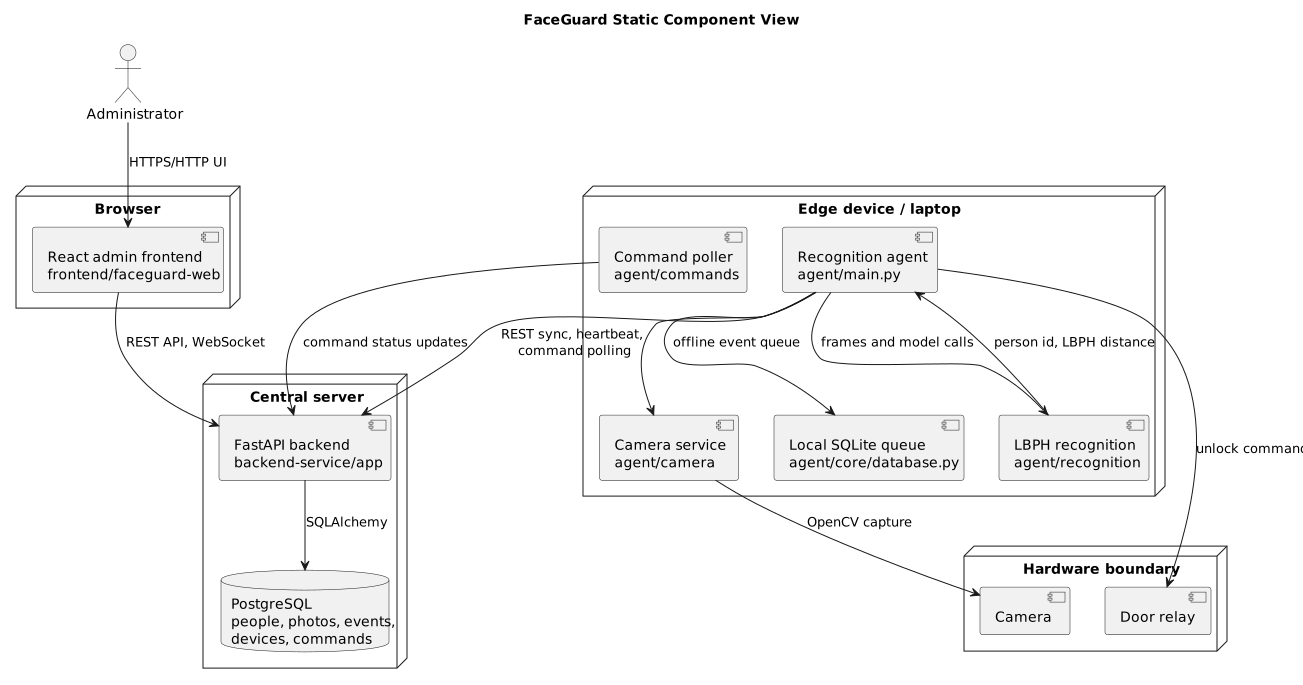
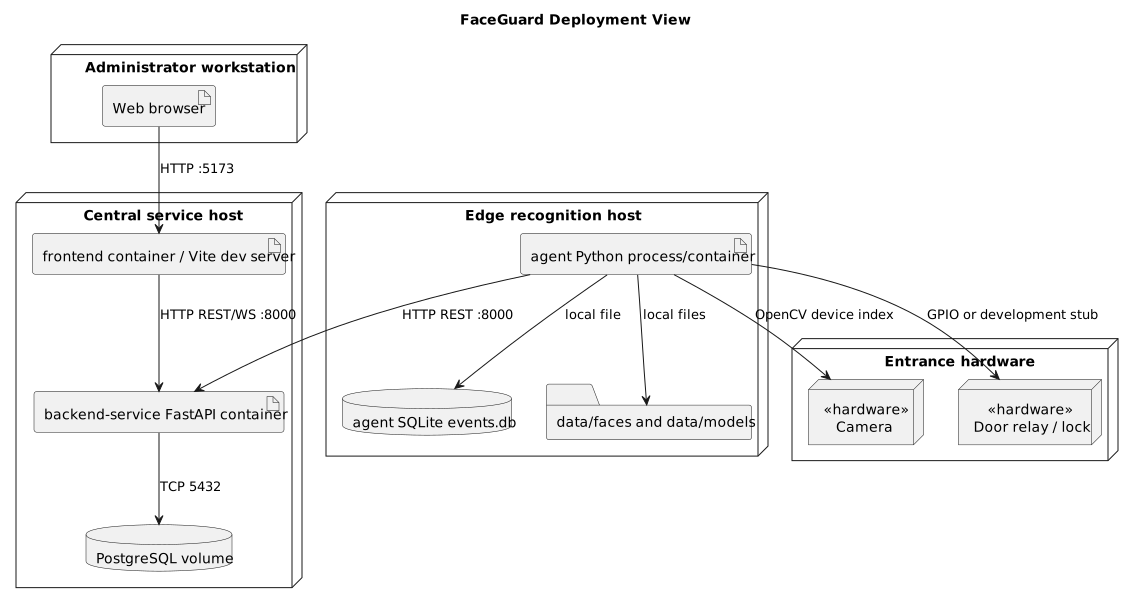
- UAT-008 - Final handover package is sufficient for independent use
UAT-001 - Review and filter access events
- Related issue: US-09 / issue #21
- Related PR: PR #50
- Current implementation status: Delivered to
main. - Objective: verify that an administrator can audit access attempts and narrow the list using date and status filters.
Preconditions
- FaceGuard frontend and backend are running in a demonstration environment.
- The environment contains access-attempt events with granted, denied, and unknown outcomes.
- No biometric images or customer-private data are shown in the public report.
Test data required
- At least 26 access-attempt events to verify pagination by 25 items.
- At least one granted event linked to a known person.
- At least one denied or unknown event where the person is shown as
Unknown. - Events across at least two dates.
- Events from at least one device or entrance location.
Customer steps
- Open the administrator web application.
- Navigate to Access Logs.
- Confirm that each visible event shows a timestamp.
- Confirm that access result is visible as granted, denied, or unknown.
- Confirm that a known person name or
Unknownis visible. - Confirm that device or location is visible.
- Apply a date filter.
- Apply a status filter.
- Confirm that CSV export is available.
- Confirm that the list is sorted newest first.
- Navigate through pagination and confirm that the page size is 25 items.
Expected result
The customer can inspect access-attempt history, filter by date and status, see person/device context, export CSV data, and navigate paginated newest-first results.
Execution record
| Field | Value |
|---|---|
| Actual result | Access Logs were covered by the private customer-executed UAT evidence and included in the follow-up scenario checklist. |
| Pass/fail | Passed; customer confirmed all user stories are approved. |
| Recording timecode | Private recording evidence only. |
| Customer comments | "Everything seems fine. All USs are approved. Continue, you have the right vision." |
| Follow-up issue | None. |
UAT-005 - Authorized-person change is effective without manual agent restart
- Related issue: PBI-A5-QA / issue #61
- Current implementation status: MVP v2 workaround reviewed; full automatic dataset/model synchronization remains follow-up work.
- Objective: verify that a change to authorized-person data becomes effective without manually restarting the recognition agent.
Preconditions
- FaceGuard backend, frontend, and recognition agent are running.
- A test device is online and can receive model refresh or synchronization commands.
- A disposable test person and non-sensitive test photos are available.
Test data required
- One authorized disposable test person.
- One change that affects recognition authorization, such as disabling access, deleting the person, or updating reference photos.
Customer steps
- Open the administrator web application.
- Change the disposable person's recognition-relevant data.
- Do not manually restart the recognition agent process.
- Wait for the documented refresh/sync interval or command completion.
- Trigger a recognition attempt or inspect the agent/model status evidence.
- Confirm that the changed authorization state is effective.
Expected result
The recognition result reflects the changed authorized-person data without a manual agent restart.
Execution record
| Field | Value |
|---|---|
| Actual result | The team demonstrated and explained model-management controls, including restarting recognition/model loading through the interface after authorized-person changes. |
| Pass/fail | Accepted for MVP v2 scope as an operator-controlled workaround; not a full automatic sync pass. |
| Recording timecode | Private recording evidence only. |
| Customer comments | Customer did not raise this as a blocking issue and asked the team to focus next on Raspberry Pi testing, recognition quality, and speed. |
| Follow-up issue | #35 is closed for the reviewed MVP v2 scope. Create a successor follow-up only if full automatic dataset/model synchronization becomes part of a later Sprint. |
UAT-006 - Strong and weak recognition results use correct confidence meaning
- Related issue: PBI-A5-QA / issue #61
- Current implementation status: Repository helper tests added; customer reviewed the display during the July 4 Sprint Review.
- Objective: verify that the administrator interface presents normalized confidence consistently: a stronger match has higher confidence, while a weaker or unknown match has lower confidence.
Preconditions
- FaceGuard frontend and backend are running with sample recognition events.
- Events include one stronger known-person match and one weaker or unknown match.
Test data required
- Example known-person event with higher normalized confidence.
- Example weaker or unknown event with lower normalized confidence.
Customer steps
- Open Access Logs.
- Locate a known-person recognition event.
- Check its displayed
Confidencevalue. - Locate an
Unknownor weaker recognition event. - Check that its displayed
Confidenceis lower than the stronger known-person event. - Confirm that a higher percentage is understandable as a stronger match.
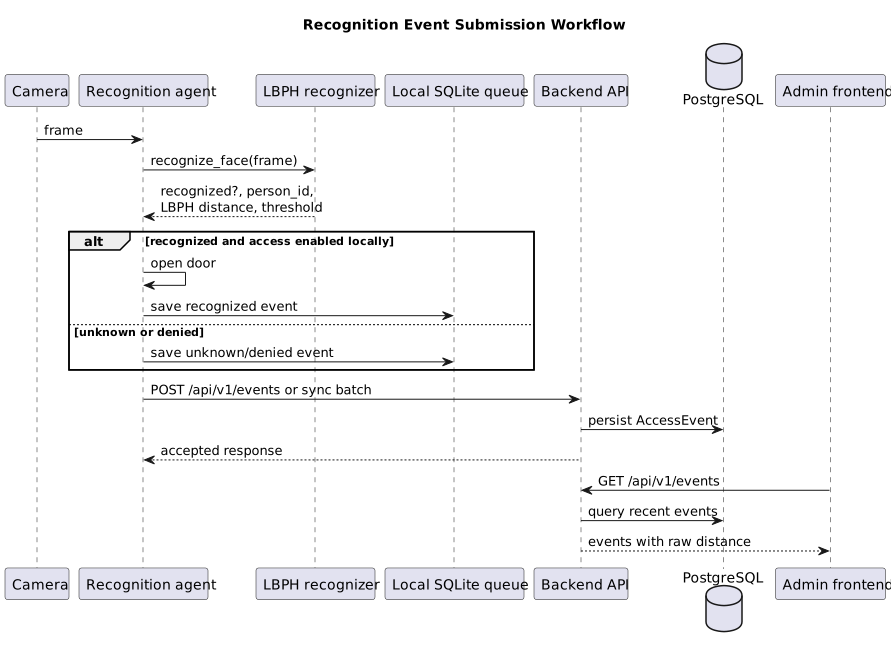
- Confirm that raw LBPH distance remains an internal recognition value and is not shown as a probability.
Expected result
The known-person event is displayed with higher confidence than the weaker or unknown event. Raw LBPH distance remains an internal recognition value and is not shown as a probability.
Execution record
| Field | Value |
|---|---|
| Actual result | Customer reviewed Access Logs confidence display after the confidence-semantics fix and confirmed that the corrected display was clear. |
| Pass/fail | Passed for the demonstrated MVP v2 scope. |
| Recording timecode | Private recording evidence only. |
| Customer comments | Customer confirmed that the confidence display was clear. |
| Follow-up issue | None for the display semantics fix; continue model-quality improvements separately. |
UAT-007 - Unavailable camera and service status are clear
- Related issue: US-05 / issue #17
- Current implementation status: Customer reviewed and accepted the MVP v2 visibility behavior.
- Objective: verify that the operator can see when the camera or main services require attention.
Preconditions
- FaceGuard frontend and backend are running in a demonstration environment.
- The camera may be intentionally unavailable, or the Raspberry Pi camera may be disconnected, to test unavailable-state clarity.
Test data required
- A device/service status state available through backend health or latest edge-device heartbeat data.
- A camera panel state where the camera is unavailable.
Customer steps
- Open the administrator web application.
- Navigate to the camera panel.
- Confirm that the unavailable camera state is visible and understandable.
- Navigate to the system/status area.
- Confirm that backend, camera/agent, and recognition status are visible.
- Confirm that visual indicators distinguish healthy and unavailable states.
Expected result
The customer can tell that the camera is unavailable and can inspect the main service statuses from the operator UI.
Execution record
| Field | Value |
|---|---|
| Actual result | Customer confirmed that the camera was clearly shown as unavailable. The team also presented backend, camera/agent, and recognition service status displays. |
| Pass/fail | Passed for MVP v2 heartbeat-derived service visibility. |
| Recording timecode | Private recording evidence only. |
| Customer comments | Customer confirmed that the camera was clearly not working in the demonstrated state. |
| Follow-up issue | #17 / US-05 is closed for the reviewed MVP v2 scope. Continue incremental real monitoring only if it is selected for a later Sprint. |
UAT-002 - Edit an authorized person
- Related issue: US-10 / issue #22
- Related PR: PR #51
- Current implementation status: Delivered to
main. - Objective: verify that an administrator can update an authorized person's details and see immediate feedback.
Preconditions
- FaceGuard frontend and backend are running in a demonstration environment.
- At least one authorized person exists.
- A suitable non-sensitive test photo is available if the environment supports photo replacement.
Test data required
- Existing authorized person record.
- New test name.
- New test note.
- Optional sanitized test photo if photo update is demonstrated.
Customer steps
- Open the People page.
- Open an existing authorized person.
- Change the person's name.
- Change the person's note.
- If the environment supports it, update the photo using a sanitized test image.
- Save changes.
- Confirm that success feedback is shown.
- Return to the people list.
- Confirm that the updated person data appears without a full browser reload.
Expected result
The updated person details are saved, success feedback is visible, and the list reflects the change immediately.
Execution record
| Field | Value |
|---|---|
| Actual result | User-management improvements were covered by the private customer-executed UAT evidence, including photo-count choices during creation. |
| Pass/fail | Passed; customer confirmed all user stories are approved. |
| Recording timecode | Private recording evidence only. |
| Customer comments | Customer asked for a follow-up message with what exactly should be tested or approved. |
| Follow-up issue | None. |
UAT-003 - Safely remove an authorized person
- Related issue: US-10 / issue #22
- Related PR: PR #51
- Current implementation status: Delivered to
main. - Objective: verify that destructive removal is protected by an explicit confirmation step and gives immediate feedback.
Preconditions
- FaceGuard frontend and backend are running in a demonstration environment.
- At least one disposable test person exists and can be removed safely.
- The test person does not contain customer data or biometric evidence that should be preserved.
Test data required
- Disposable authorized person record.
- Confirmation value:
DELETE.
Customer steps
- Open the People page.
- Open a disposable authorized person.
- Open the delete dialog.
- Confirm that deletion is impossible before typing
DELETE. - Type an incorrect value.
- Confirm that the destructive action remains disabled.
- Type the exact value
DELETE. - Confirm deletion.
- Confirm that success feedback is shown.
- Confirm that the person disappears from the list immediately.
Expected result
The person cannot be removed without exact typed confirmation. After confirmed removal, the UI shows success feedback and the list updates immediately.
Execution record
| Field | Value |
|---|---|
| Actual result | Delete confirmation for people and logs was covered by the private customer-executed UAT evidence as a data-loss risk reduction. |
| Pass/fail | Passed; customer confirmed all user stories are approved. |
| Recording timecode | Private recording evidence only. |
| Customer comments | Customer asked to be reminded what was done; team summarized deletion confirmation and Dashboard refresh. |
| Follow-up issue | None. |
UAT-004 - Dashboard manual refresh
- Related issue: PBI-A4-16 / issue #47
- Related PR: PR #52
- Current implementation status: Delivered to
main. - Objective: verify that an administrator can manually refresh Dashboard data and see when the data was last updated.
Preconditions
- FaceGuard frontend and backend are running in a demonstration environment.
- Dashboard data is available.
Test data required
- People, event, statistics, and health data visible on the Dashboard.
Customer steps
- Open the Dashboard.
- Locate the compact refresh button.
- Confirm that a last-updated value is visible.
- Click refresh.
- Confirm that the button shows a loading or disabled state while refresh is in progress.
- Confirm that the browser page does not fully reload.
- Confirm that the last-updated value changes after a successful refresh.
Expected result
The Dashboard refreshes current data on demand and gives clear last-updated feedback without a full page reload.
Execution record
| Field | Value |
|---|---|
| Actual result | Dashboard refresh was covered by the private customer-executed UAT evidence as a completed Sprint improvement. |
| Pass/fail | Passed; customer confirmed all user stories are approved. |
| Recording timecode | Private recording evidence only. |
| Customer comments | Customer accepted the summary and moved to next-Sprint priorities. |
| Follow-up issue | None. |
UAT-008 - Final handover package is sufficient for independent use
- Related report: Week 7 final customer acceptance summary
- Current implementation status: Accepted for independent local/private-network use.
- Objective: verify that the customer considers the final presentation, handover file, and repository sufficient to run and continue the project.
Preconditions
- Final presentation/demo video is available to the customer.
- Repository and handover instructions are available to the customer.
- Private credentials and access details are handled outside the public repository.
Customer steps
- Review the final product presentation/demo.
- Review the handover file and repository.
- Confirm whether the materials are sufficient to launch and use the project.
- State whether the project is accepted or whether blockers remain.
Expected result
The customer confirms that the handover materials and repository are sufficient for independent use, while any production deployment or hardware follow-up remains separately tracked.
Execution record
| Field | Value |
|---|---|
| Actual result | Customer confirmed that the provided handover file and repository were sufficient, and accepted the project as ready for independent use. |
| Pass/fail | Passed. |
| Recording timecode | Private recording evidence only. |
| Customer comments | Customer stated that the project was ready, looked good, and worked. |
| Follow-up issue | None for final handover acceptance. Continue optional future improvements for more powerful hardware/models and production deployment if selected later. |