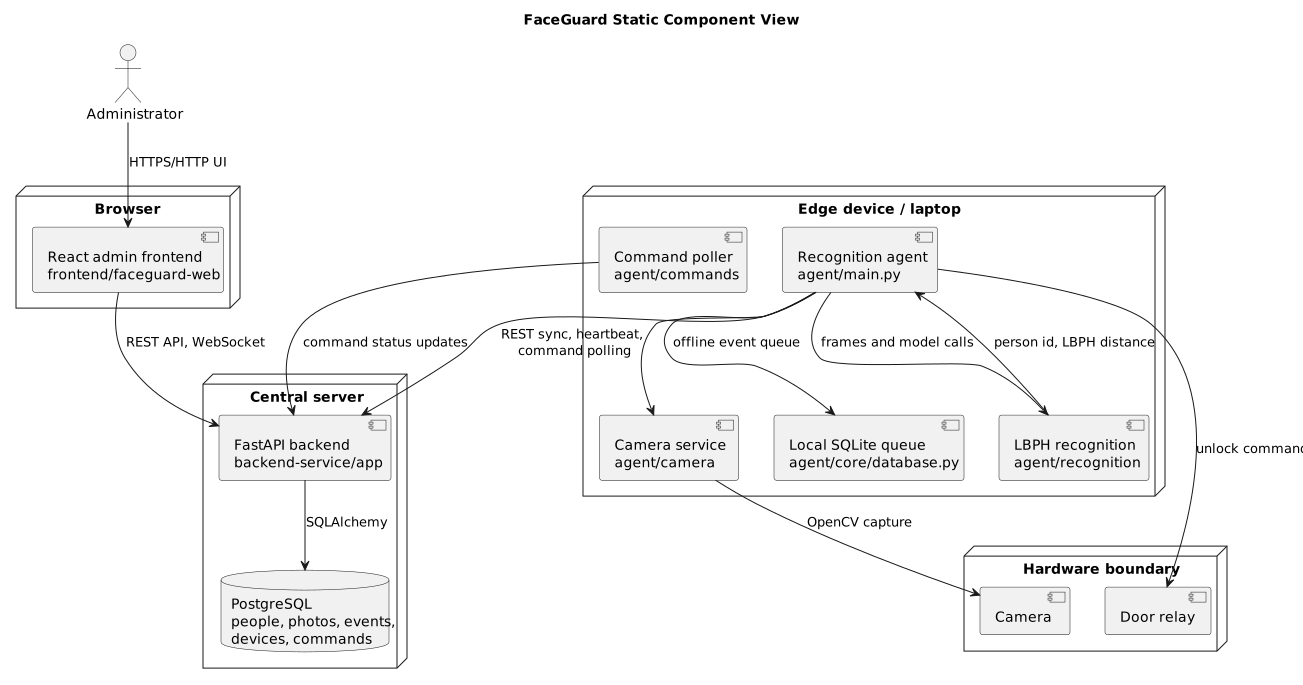
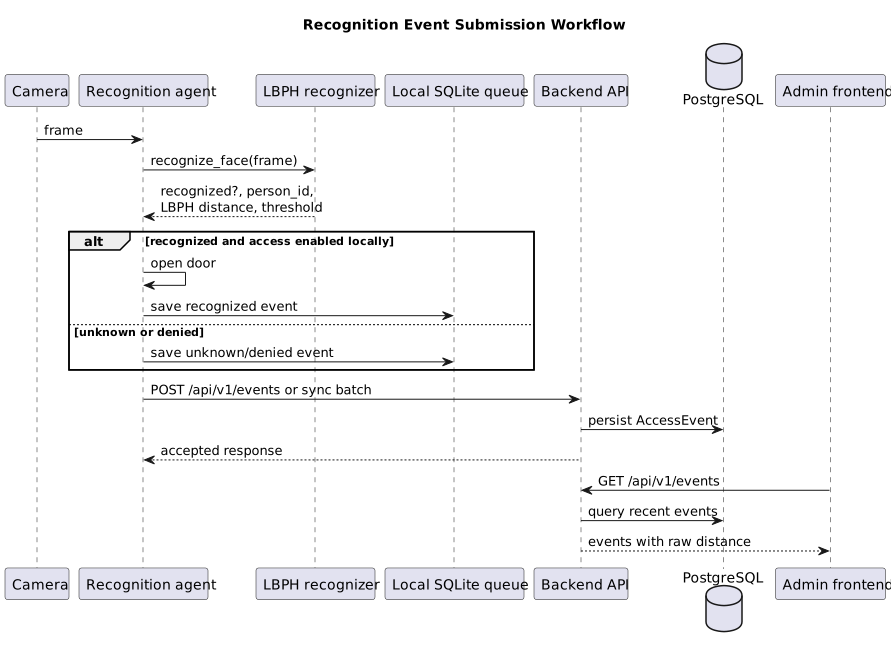
Customer Handover - FaceGuard
Status as of: July 19, 2026 / Assignment 6 Week 7 final handover review Handover level reached: Accepted for independent local/private-network use Customer-confirmation status: Accepted by the customer during the recorded July 19, 2026 final review
This document describes the actual current handover state of FaceGuard. It does not claim customer-side production deployment unless the public repository contains evidence for it.
1. What Was Transferred, Delegated, or Retained
| Item | Current state | Notes |
|---|---|---|
| Source repository | Shared through GitHub | Public repository is available at Innopolis-Robotics-Society/FaceGuardV1; write/admin access remains with the organization maintainers. |
| Hosted documentation | Shared through GitHub Pages | Public docs are published at https://innopolis-robotics-society.github.io/FaceGuardV1/. |
| CI/CD | Retained by repository maintainers | GitHub Actions remain configured in the repository. Customer-side ownership transfer is not evidenced publicly. |
| Product access | Private/local deployment model | Full recognition requires local hardware and credentials. Public access is through source, releases, docs, reports, and sanitized demo videos. |
| Runtime credentials | Private channel only | Credentials and secrets must be shared outside the public repository, for example through the Moodle/private evidence channel or a customer-approved secrets manager. |
| Hardware setup | Team-prepared and accepted for handover | Raspberry Pi/camera/LED behavior is documented, but customer-side production operation is not evidenced in the public repository. |
2. Configuration and Environment
FaceGuard is configured through environment files and Docker Compose. Public templates are safe to commit; real values are not.
Important configuration files:
- root .env.example for repository-level defaults;
- agent agent/.env.example for camera, recognition, backend URL, anti-spoofing, and LED settings;
- backend backend-service/docker-compose.yml;
- frontend frontend/faceguard-web/ENV_CONFIG.md.
Important public variables:
| Variable | Purpose |
|---|---|
BACKEND_URL |
Backend URL used by the recognition agent. |
DEVICE_CODE |
Stable code used to identify the edge device. |
HARDWARE_MODE |
development for laptop/mock mode, raspberry_pi for Pi GPIO/camera mode. |
CAMERA_INDEX, CAMERA_WIDTH, CAMERA_HEIGHT, CAMERA_FPS |
Camera source and capture settings. |
RECOGNITION_THRESHOLD |
LBPH raw-distance threshold; lower distance is a stronger match. |
ANTISPOOFING_ENABLED, ANTISPOOFING_MODEL_PATH |
Optional MiniFASNet anti-spoofing configuration. |
LED_GRANTED_GPIO_PIN |
Blue access-granted LED, default BCM 17. |
LED_CALIBRATING_GPIO_PIN |
Yellow calibrating/operator-attention LED, default BCM 27. |
LED_DENIED_GPIO_PIN |
Red denied/unknown LED, default BCM 22. |
Secrets, credentials, private model data, biometric samples, private recordings, and private customer evidence are not stored in this repository.
3. Setup, Deployment, Recovery, and Verification
Normal setup starts from the root README.md.
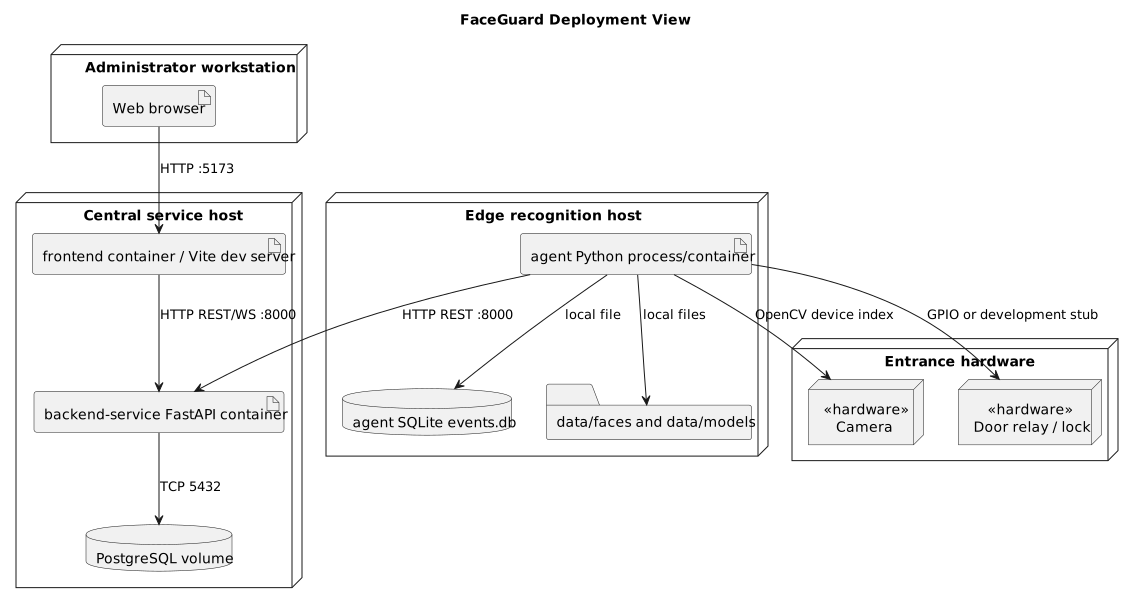
Local/private-network run path:
- Start the backend and database:
bash
   cd backend-service
   docker compose up --build
- Start the frontend:
bash
   cd frontend/faceguard-web
   npm install
   npm run dev
- Configure and start the recognition agent:
bash
   cd agent
   cp .env.example .env
   docker compose up --build
- Verify the backend:
bash
   curl http://localhost:8000/api/v1/system/health
-
Verify the UI by opening the Vite URL, usually
http://localhost:5173. -
On Raspberry Pi, verify the LED indicator:
- blue/granted LED turns on for granted/manual-open signal;
- yellow/calibrating LED can be triggered for calibration/operator attention;
- red/denied LED turns on for unknown or denied access events.
Recovery steps:
- restart backend/database with
docker compose restartinbackend-service; - restart frontend with the package manager command used to run it;
- restart the agent with
docker compose restartinagent; - inspect
agent/data/logs/agent.logand backend logs for connection, camera, recognition, or command failures; - if the agent was offline, allow it to resync buffered SQLite events after the backend is reachable again.
4. Main Documentation Entry Points
| Need | Document |
|---|---|
| First-time repository overview | README.md |
| Hosted documentation | GitHub Pages docs |
| Architecture | docs/architecture/README.md |
| Deployment view | docs/architecture/deployment-view/deployment-diagram.svg |
| Testing and CI | docs/testing.md |
| Quality requirements | docs/quality-requirements.md |
| UAT | docs/user-acceptance-tests.md |
| Code entry points | docs/code-reference.md |
| Contribution workflow | CONTRIBUTING.md |
| AI/agent maintainer guidance | AGENTS.md |
5. Troubleshooting and Support
| Symptom | Likely cause | What to do |
|---|---|---|
| Backend health endpoint is unavailable | Backend container is down, port is blocked, or database startup failed | Run docker compose ps and docker compose logs in backend-service; restart the stack. |
| Agent logs show backend connection errors | BACKEND_URL is wrong or backend is unreachable from the device |
Set BACKEND_URL to the reachable backend IP/host and verify with curl. |
| Camera is unavailable | Missing hardware, wrong CAMERA_INDEX, missing Pi camera config, or Docker passthrough issue |
Check agent/SETUP.md, camera device availability, and agent logs. |
| Recognition model is not trained | No reference photos or model rebuild has not run | Capture enrollment photos and run the rebuild_model command. |
| Recognition is too permissive or too strict | LBPH threshold is not tuned for the environment | Lower RECOGNITION_THRESHOLD for stricter matching; increase it for fewer false denials. |
| LED indicator does not light | Wrong GPIO pins, missing gpiozero, wiring issue, or non-Pi development mode |
Check LED_*_GPIO_PIN, wiring, HARDWARE_MODE=raspberry_pi, and agent logs. |
Support expectation: no public evidence of an ongoing post-course support contract exists. Critical private access/support expectations must be handled through the customer and course private channels.
6. Known Limitations
- Full real-time recognition requires local hardware and camera access.
- Public deployment cannot expose a permanent camera stream because it may process biometric data.
- Customer-side production deployment or operation is not publicly evidenced.
- Final customer acceptance for independent use was confirmed during the July 19, 2026 recorded handover review.
- Low-light performance (#16) is still a hardware-dependent limitation without public IR-camera/IR-light validation.
- The scanner decision signal is implemented as LED feedback; audio feedback is still not evidenced.
- Anti-spoofing model source/license and formal live-vs-spoof pass/fail evidence still need final public documentation or private evidence.
- GitHub repository description/topics require repository admin access and cannot be changed by a normal code commit.
7. Documentation Sufficiency
The documentation was accepted by the customer as sufficient together with the repository for independent local/private-network use. It is sufficient for a technical reviewer or customer-side maintainer to inspect, run, and verify FaceGuard with team-provided credentials and hardware. It is not sufficient to claim customer-side production operation, because deployment evidence is not present in the public repository.
8. Follow-Up Items
| Item | Blocker type | Required action |
|---|---|---|
| Final customer acceptance | Customer/team coordination | Completed in the recorded July 19, 2026 final review; keep the recording/protocol/transcript in the private Moodle evidence package if publication is not separately approved. |
| Customer-side deployment evidence | Customer-side or team-side | Capture sanitized public summary and private access evidence if deployment happens. |
| GitHub repository description/topics (#78) | Repository admin access | Update repository settings directly in GitHub. |
| Low-light validation (#16) | Hardware/environment | Test with representative low-light entrance conditions and IR-capable hardware. |
| Audio decision signal | Hardware/product scope | Add buzzer/audio output if still required by #18 acceptance criteria. |
| Final MVP v3 release | Repository release workflow | Create a SemVer release after final code/docs are merged to protected main. |
9. Confirmation Evidence
The final handover review was held on July 19, 2026 with recording permission obtained. The private meeting materials record the exact participant list, including the customer representative and team members.
The customer reviewed the final product presentation and transfer materials, confirmed that the provided handover file and repository were sufficient for launching the project, and accepted the project as ready for independent use. The public sanitized status is summarized in reports/week7/final-customer-acceptance-summary.md. The raw recording, transcript, protocol, exact access details, and credentials belong in the private Moodle/customer evidence package unless the customer gives separate publication approval.